
A meeting platform built everyday use
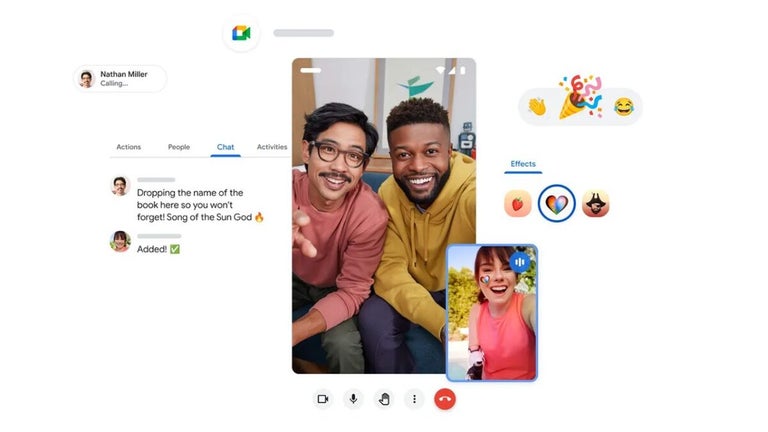
Google Meet is a free video conferencing tool designed for communication, collaboration, and remote interaction. It sits in the productivity and communication genre, offering a simple way to host meetings directly through a browser or app.

Unlock your creativity with Adobe Stock
Get 10 images or 1 video with a free trial
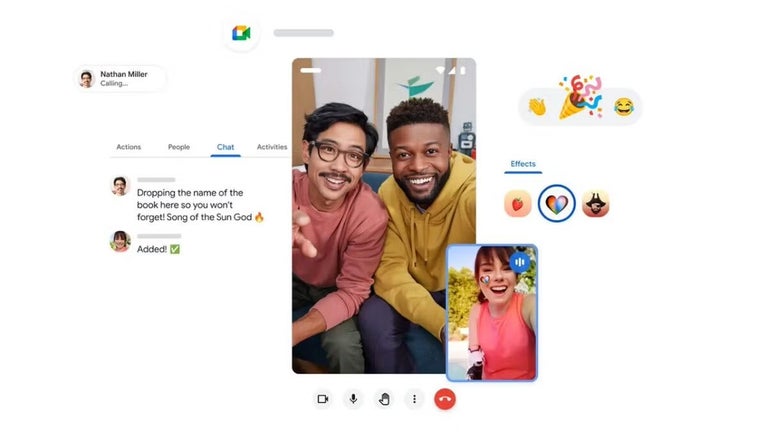
Instead of requiring complex setup, Google Meet focuses on accessibility, allowing users to join meetings through links with minimal effort. This creates a browser based meetings experience that works across devices without additional downloads. Visually, the interface is clean and centered around video feeds, with controls placed clearly for muting, camera toggling, and screen sharing, making navigation easy even during active calls.
From quick calls to structured collaboration
As a communication platform, Google Meet focuses on reliability and ease of use. Users can start or join meetings quickly, share screens, and collaborate in real time. This results in a real time video calls system that supports both casual conversations and professional meetings. Integration with Google services like Calendar and Gmail makes scheduling and joining meetings more efficient, as invites and reminders are handled automatically.
It does not try to overload users with features, instead focusing on stable performance and easy access. It works well for both personal and professional use, especially for users already within the Google ecosystem. At the same time, users who need advanced webinar tools or deeper customization may find it less flexible. Even so, its ease of use makes it a reliable option for everyday communication.
Video quality adjusts based on connection speed, helping maintain smooth calls even on weaker networks. Audio processing reduces background noise, allowing voices to remain clear during conversations. Layout options allow users to focus on active speakers or view multiple participants at once. This creates a clear audio video setup that keeps communication consistent and understandable. However, larger meetings reveal its limitations, lacking more advanced collaboration tools and larger room capacity.
A dependable meeting app that keeps communication simple
Google Meet succeeds by making video calls feel quick, stable, and easy to access across different devices and situations. Its clean interface, solid Google integration, and reliable audio-video performance make it a practical choice for both everyday conversations and work meetings. However, while it handles routine communication well, it can feel more limited in larger meetings where advanced collaboration tools and broader room capacity start to matter more.